You can import packages that were previously created by the FlexApp Packaging Console rather than re-creating them.
To import a package, complete the following steps:
- On the FlexApp Packaging Console screen, click the down arrow next to the Create button.
-
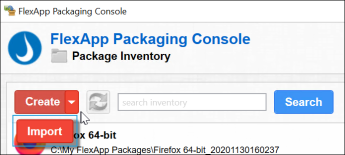
- Click the Import button.
- The Import a Package screen opens
- If the package is located on cloud storage, select the Cloud Package checkbox to select the Cloud Credentials that are used to access the package.
- Enter the location and filename of the package you want to import.
- Click the Import button.