The Environment Variables module sets and clears environment variables. Environment variables are modified in the environment of the current user.
Note: This configuration module has moved. Formerly, the Environment Variables module preceded the Registry module. Starting with 6.8.5, the Environment Variables module now follows the Main module. Since most module settings are processed in the same order as they appear on the Configuration Management screen, it is possible for behavioral differences to exist between older and newer configurations created with different versions of the ProfileUnity Management Console.
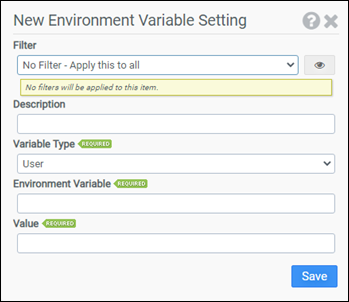
Filter
Select the name of the filter you want assigned to this configuration element. Click the Show Filter Details button on the right to review any filter settings without leaving Configuration Management.
Description
Enter a description for this rule.
Variable type
Select whether this is a User or System variable.
Environment Variable
Enter the name of the environment variable you want to modify. The name should not be enclosed in percent signs.
Value
Enter the value you want assigned to the environment variable. Leaving this value blank will delete the environment variable.
Example
This example assigns the value C:\MyDir to the environment variable MYDIR.
- Filter: No Filter – Apply this to all
- Variable Type: User
- Environment Variable: MYDIR
- Value: C:\MyDir