You can use a VHDX at the OS level to assign applications at computer startup with FlexApp or if you need to layer applications on RDSH or XenApp.
To set up a VHDX, complete the following steps:
- Set up ProfileUnity to run at the system level. Start by creating a GPO on the computer OU where you want ProfileUnity to run on computer startup.
- Set up
startup.exeto run on computer startup. - Under the Computer Configuration folder, import the ProfileUnity ADM from the Deployment Path.
- Go to Classic Administrative Templates > Liquidware Labs > ProfileUnity > Bit level of your desktops.
- Set your System INI path to a directory under your Deployment Path called
\Startup. \\dc.local\netlogon\ProfileUnity\Startup-
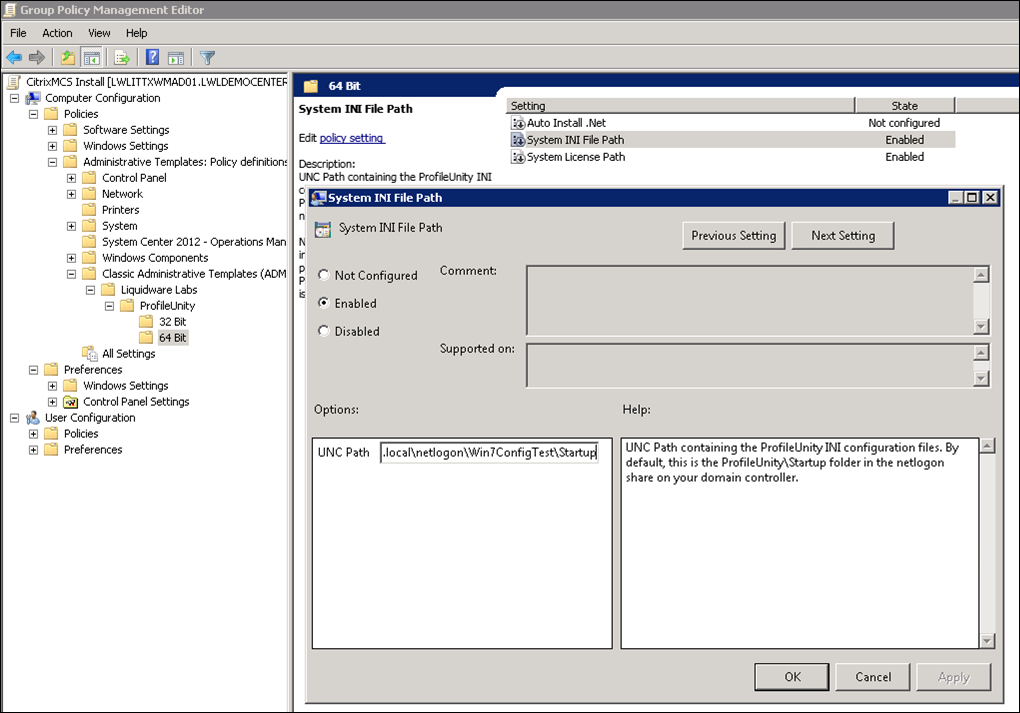
- From the ProfileUnity Management Console, navigate to Administration > Settings > ProfileUnity Tools and go to Run Client Tools As Service. Fill in fields as seen including domain\user and password. This user does not need to be an administrator, but does have to be a domain user account.
- Click the Update button in the top right corner of the screen.
- From the ProfileUnity Tools section, click the Download or Deploy Service Configuration button. The Deployment Path should be:
-
\\dc.local\netlogon\ProfileUnity - Using the FlexApp Packaging Console, create a package selecting VHDX as the Package Type and choose the datastore the package will be saved to.
- In the ProfileUnity Management Console, use the FlexApp DIA Configuration Module to assign FlexApp packages to users. Build a configuration with apps that will be global to the computer, then place that INI into
\\dc.local\netlogon\ProfileUnity\Startup, nothing should be in\Startupbut an INI of things you want to run on computer startup. - Reboot or refresh all user desktops. If Microsoft® .NET Framework 4.6.2 is not installed in the base operating system on a particular desktop, ProfileUnity will install it after the desktop restarts. The installation of .NET 4.6.2 will increase the time it takes before the desktop is available again.