To change any FlexApp Packaging Console settings, click the  (Gears) button in the top right corner of the screen.
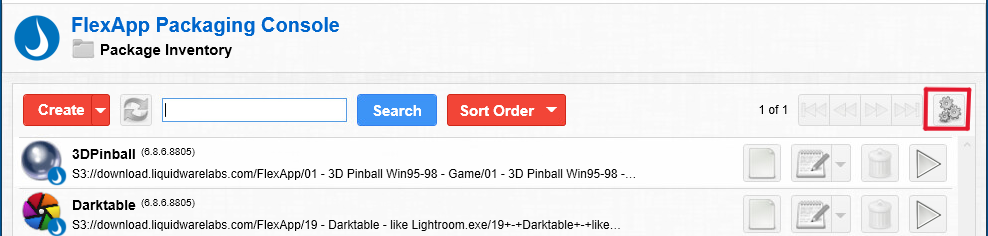
The Settings screen that opens when you click the Gears button displays the software release number and the software version number for the FlexApp Packaging Console you have installed.
Note: To save time when packaging applications, you should initially enter values in any or all of the Basic Settings fields before taking your clean-state snapshot.
The following Basic Settings can be configured or modified:
- Default Installer Location—The default installer location to use when creating a package.
- Default VHDX Location—The default VHDX storage location to use when creating a package. VHDX is compatible with Windows Server 2016 and higher.
- S3 Cloud Credentials—The default credentials to be used when accessing Amazon S3 cloud storage.
- S3 Cloud Location—The default location to be used when creating a new package on Amazon S3 cloud storage.
- Azure Cloud Credentials—The default credentials to be used when accessing Microsoft Azure Blob cloud storage.
- Azure Cloud Location—The default location to be used when creating a new package on Microsoft Azure Blob cloud storage.
- Google Cloud Credentials—The default credentials to be used when accessing Google cloud storage.
- Google Cloud Location—The default location to be used when creating a new package on Google cloud storage.
- Default Local Install Location—The default VHDX storage location to use when creating a package.
By scrolling further down on the Settings screen, you can also configure or modify the following Advanced Settings:
- Machine Optimization Template—The template that will be used for machine optimizations.
- Capture User Profile Data—Include User Profile data when creating a package. This includes capturing the user's AppData folder. User Profile data is persistent on playback.
- Enable Rollback—Select this checkbox to enable using Rollback on this machine.
- Rollback Created On—Displays the date and time the last Rollback ID was created.
- Auto Compact VHDXs—Select this checkbox to compact a VHDX after creation or modification.
- Auto Compact Minimum Size—The minimum size in MB that a disk must contain to be compacted.
- Create FlexApp One Default—The default value for Create FlexApp One when creating or modifying a package.
- Create FlexApp One Arguments—Specify additional arguments to be used when creating a FlexApp One.
- Optimize Package Default—The default value for Optimize New Package when cloning or merging a package.
- Default Capture Mode—Choose the mode to use when capturing system changes. Options are Normal (Legacy) or High Compatibility (default).
- Create PrePlay Cache—PrePlay Caching is used for Cloud packages to ensure that all data required for playback is local prior to attaching the package.
- Temp Cloud Download Path—The location to be used when downloading cloud files.
- Temp VHDX Mount Path—The location where the VHDX is mounted. VHDX is compatible with Windows Server 2016 and higher.
- Log Level—Set the logging level for the Packaging Console. The default level is Debug.
- Log Location—The location of the FlexApp Packaging Console log file.
- Command Line Log Path—The location where the FlexApp tools write to their log file.
- LwlUserApp XML Location—The location of the
lwluserapp.xmlfile. - LwlUserApp XML Log Path—The location of the logfile for
lwluserapp.xml. - LwlUserAppPlayer XML Location—The location of the
lwluserappplayer.xmlfile. - LwlUserAppPlayer XML Log Path—The location of the logfile for
lwluserappplayer.xml. - Active Package Path—The location of the
activepackage.xmlfile. This file is used to keep track of any currently activated packages.


