The Desktop Start Menus module allows a user to add a classic start menu to Windows 8.1 and Windows Server 2012 R2 desktops. By default, this module is hidden. To use this configuration module, go to Administration > Settings > Miscellaneous and uncheck the Hide Desktop Start Menu Module checkbox.
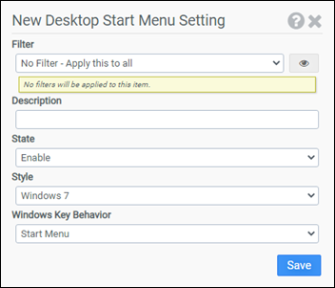
Filter
Select the name of the filter you want assigned to this configuration element. Click the Show Filter Details button on the right to review any filter settings without leaving Configuration Management.
Description
Enter a description for this rule.
State
Choose whether to Enable or Disable the start menu on the desktop.
Style
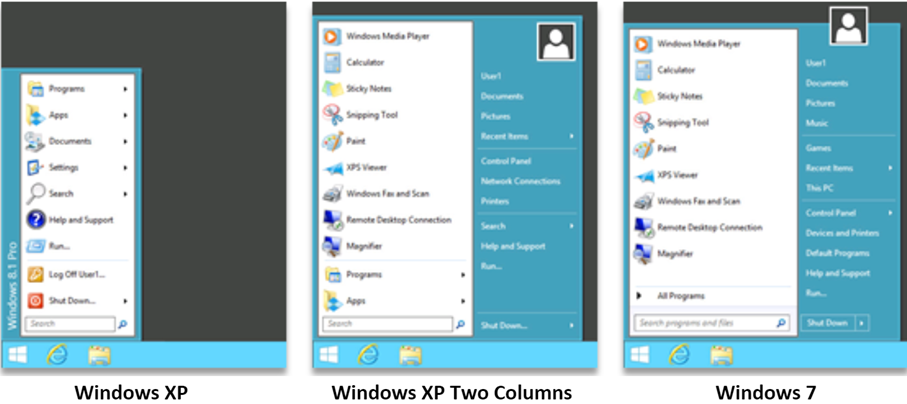
Choose which style of start menu to use: Windows XP, Windows XP Two Columns, or Windows 7.
Windows Key Behavior
Indicates how the user’s Windows key should behave when pressed. Choose to bring up the Start Menu or the Windows 8 Metro Start Screen.
Example
This example will enable the use of a desktop start menu similar to Microsoft’s Windows 7 Start Menu.
- Filter: No Filter – Apply this to all
- State: Enable
- Style: Windows 7
- Windows Key Behavior: Start Menu