This module is used to configure Windows Messaging subsystem profiles for access to Microsoft Exchange Server 2010. The Windows Messaging subsystem is used by Microsoft Outlook to communicate with Microsoft Exchange. This module supports Outlook 2003/2007/2010 in conjunction with Microsoft Exchange 2010. To use this configuration module, go to Administration > Settings > Miscellaneous and uncheck the Hide MAPI Profiles Module checkbox.
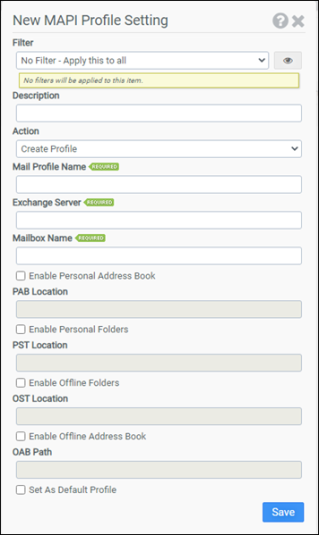
Filter
Select the name of the filter you want assigned to this configuration element. Click the Show Filter Details button on the right to review any filter settings without leaving Configuration Management.
Description
Enter a description for this rule.
Action
Select one of the following actions:
- Create Profile
- Create - Only if No Profiles Exist
- Create - Only if No Profile Exists with this Name
- Delete Profile
- Delete All Profiles
- Delete All Profiles - Except Default Profile
Mail Profile Name
Enter the name of the mail profile. This option is not available if Delete All Profiles or Delete All Profiles - Except Default Profile is selected as the Action.
Exchange Server
Enter the name of the Exchange Server. This option is only available if Create Profile, Create - Only if No Profiles Exist, or Create - Only if No Profile Exists with this Name is selected as the Action.
Note: Outlook 2003 will hang during logon if the exchange server is not valid or available.
Mailbox Name
Enter the name of the mailbox. This option is only available if Create Profile, Create - Only if No Profiles Exist, or Create - Only if No Profile Exists with this Name is selected as the Action.
Enable Personal Address Book
Selecting this option will configure the mail profile to use a personal address book. You will need to enter the complete path to the personal address book in the PAB Location field. This option is only available if Create Profile, Create - Only if No Profiles Exist, or Create - Only if No Profile Exists with this Name is selected as the Action.
PAB Location
Enter the personal address book location. This option is only available if Enable Personal Address Book is selected.
Enable Personal Folders
Selecting this option will configure the mail profile to use personal folders. You will need to enter the complete path to the personal folder file in the PST Location field. This option is only available if Create Profile, Create - Only if No Profiles Exist, or Create - Only if No Profile Exists with this Name is selected as the Action.
PST Location
Enter the personal folder file location. This option is only available if Enable Personal Folders is selected.
Enable Offline Folders
Selecting this option will configure the mail profile to use offline folders. You will need to enter the complete path to the offline folder file in the OST Location field. This option is only available if Create Profile, Create - Only if No Profiles Exist, or Create - Only if No Profile Exists with this Name is selected as the Action.
Note: If the offline folder file specified in OST Location currently exists, it will be deleted. Offline folders are not supported on Terminal Servers.
OST Location
Enter the offline folder file location. This option is only available if Enable Offline Folders is selected.
Enable Offline Address Book
Selecting this option will configure the mail profile to use an offline address book. You will need to enter the complete path to the offline address book in the OAB Location field. This option is only available if Create Profile, Create - Only if No Profiles Exist, or Create - Only if No Profile Exists with this Name is selected as the Action.
OAB Location
Enter the offline address book location. This option is only available if Enable Offline Address Book is selected.
Set as Default Profile
Selecting this option will configure the mail profile as the default profile.
Example
This example will create a mail profile named LIQUIDWARELABS only if no profiles currently exist. This example leverages the macro @USERID. When ProfileUnity executes, the @USERID macro is expanded into the username. Therefore, the above example will create a mail profile that connects to each user’s mailbox on the exchange server named ATLEX01. The mail profile will be configured to use H:\mail.pab as a personal address book and will be set as the default profile.
- Filter: No Filter – Apply this to all
- Action: Create - Only if No Profiles Exist
- Mail Profile Name: LIQUIDWARELABS
- Exchange Server: ATLEX01
- Mailbox Name: @userid
- Enable Personal Address Book: Selected
- PAB Location: H:\mail.pab
- Enable Personal Folders: Not selected
- Enable Offline Folders: Not selected
- Enable Offline Address Book: Not selected
- Set as Default Profile: Selected