The File Associations module is used to create a mapping between a particular file extension and an associated executable, allowing you to control which default application should be started when using a certain file type. Optional command line options to use when running the executable can be specified as well. Admins can control which users are assigned which File Association rules by using Filters.
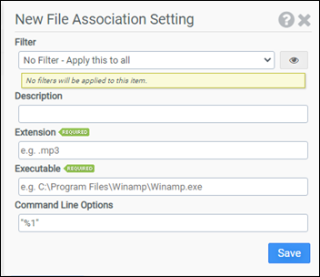
Filter
Select the name of the filter you want assigned to this configuration element. Click the Show Filter Details button on the right to review any filter settings without leaving Configuration Management.
Description
Enter a description for this rule.
Extensions
Enter the file extension for which you are creating a mapping.
Executable
Enter the executable you want to associate with the extension. Note that some system applications like Notepad do not require a full path, just notepad.exe, while third party applications will require the full path: C:\Program Files\yourapp.exe.
Command Line Options
Optionally enter any command line options that the executable should use when running.
Example
This example will associate .mp3 files with the Winamp application.
- Filter: No Filter - Apply this to all
- Extension: .mp3
- Executable: C:\Program Files\Winamp\winamp.exe