Administrators wanting to utilize a custom written script will add it to their configuration here. ProfileUnity offers the option to include custom scripts both before ProfileUnity (Pre-Execution) and after ProfileUnity (Post-Execution).
Note: Custom scripts are not checked for proper syntax or function. You are encouraged to create and test your custom scripts prior to inclusion with the User Defined Scripts module.
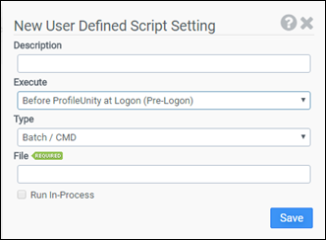
Description
Enter a description for this rule.
Execute
Select when your custom script should execute:
- Before ProfileUnity at logon (Pre-logon)
- After ProfileUnity at logon (Post-logon)
- Before ProfileUnity at logoff (Pre-logoff)
- After ProfileUnity at logoff (Post-logoff)
Type
Select the type of script you are including:
- Batch/CMD
- KiXtart
- Windows Script Host
- Executable
- PowerShell
File
Enter the full path to your script. Surrounding quotes are automatically added to the file.
Note: The recommended location to store your custom scripts is in the NETLOGON share on your domain controller. Custom scripts stored in this location will take advantage of replication and can be included as follows: @lserver\netlogon\[your_script].kix
Run In-Process
Selecting this option will merge your custom KiXtart script into ProfileUnity. This option should only be selected if you want all or parts of your script exposed to ProfileUnity. For example, if you are utilizing a Custom Function (deprecated feature) as part of a filter, this option must be selected.