The Main configuration module is used to define parameters for a configuration that apply to all users.
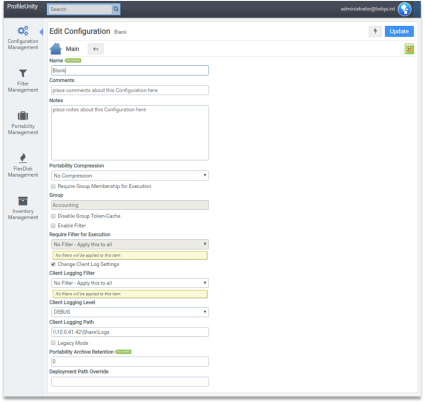
Name
Enter a name that helps you identify your configuration.
Important: When ProfileUnity executes, it obtains the list of available configurations from the authenticating domain controller. If a configuration named Default is present, it is always processed first. The remaining configurations are processed in alphabetical order.
Comments
Enter a description that helps you identify your configuration.
Notes
Enter notes that help you identify your configuration.
Portability Compression
Choose the compression algorithm used by the Portability Settings configuration module:
- Smaller Archives: Uses LZMA compression for smaller archives
- Faster Archives: Uses LZO compression for faster performance
- No Compression
Require Group Membership for Execution—Select this checkbox to restrict execution of this configuration to members of the global group specified in the Group field.
Group
This field is only available if the Require Group Membership for Execution checkbox is selected
- Disable Group Token-Cache Profile: Unity caches group membership information in the registry to reduce the amount of network traffic generated during user logon. However, if an existing group is renamed, the token-cache does not update itself immediately. If you experience problems filtering by Group Membership, selecting this checkbox disables the cache.
- Enable Filter: Select this checkbox to restrict the execution of this configuration based on a filter.
Require Filter for Execution
This field is only available if Enable Filter is selected. The execution of this configuration is restricted to members of the selected filter, such as operating system, Microsoft Office version detected, or any custom filter.
Change Client Log Settings
Select this checkbox to restrict the logging of this configuration based on a filter.
Client Logging Filter
This field is only available if Enable Client Log Filter is selected. The logging of this configuration is restricted to members of the selected filter, such as operating system, Microsoft Office version detected, or any custom filter.
Client Logging Level
This field is only available if Enable Client Log Filter is selected. The logging level controls the amount of logging information output. Choose either the Fatal or Debug option.
Client Logging Path
This field is only available if Enable Client Log Filter is selected. Enter the location where you want to store the log file.
Legacy Mode
Affects how the Portability Compression algorithms work. Select this checkbox to use older compression algorithms that support Windows Vista, or Windows Server 2008 users. If the checkbox is not selected, the ProfileUnity Client uses newer compression technology intended for Windows 7 and above users.
Note: If an operating system prior to Windows 7 is detected when attempting to use the new compression technology, the ProfileUnity Client falls back to the older compression method, which is slower.
Portability Archive Retention
This field is used to set the maximum number of copies of user portability settings to keep. A user’s portability settings are saved at session logoff. Copies of archives and manifests will be saved to a Retention folder under where user settings are stored. Any or all of the copies can be used as a restore point to restore a user’s settings to a previous state. The default is 0 which does not retain any archives.
Deployment Path Override
Use this setting to override the default deployment path set in the ProfileUnity Tools section of the Administration > Settings tab. Leave this blank to use the default deployment path from the Administration screen. Note that in order for this override setting in the Main configuration module to work, the Overwrite files if they exist checkbox in the ProfileUnity Tools section of the admin settings must be selected. The overwrite option is a global setting in the Management Console. If overwrites are not permitted (checked), then the Deployment Path Override is ignored.