The FlexApp module is used to control the assignments of FlexApp applications. On logout, ProfileUnity automatically reverse plays the application and removes the application from the system.
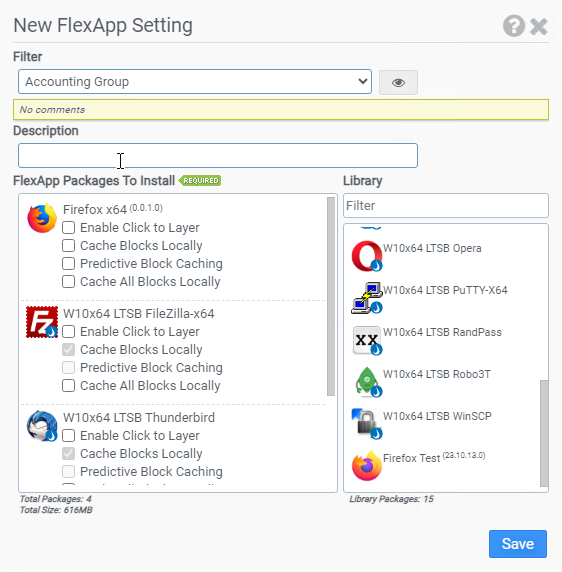
Filter
Select the name of the filter you want assigned to this configuration element. Click the Show Filter Details button on the right to review any filter settings without leaving Configuration Management.
Description
Enter a description for this rule.
FlexApp Packages to Install
Drag packaged applications from the Library list over to this list so that they can be included with the user’s profile at login.
- Enable Click-to-Layer: Use the Click-to-Layer feature to postpone layering in a FlexApp package at login time while still giving the user an application shortcut. If and when the user clicks on the shortcut to use the application during their session, ProfileUnity layers in the application on demand. This feature is useful for applications that are less frequently used.
- Cache Blocks Locally: Use the Cache Blocks Locally feature to replay using a cached mode on user desktops, which is particularly helpful with inconsistent network connections, SMB shares behind firewalls, and routers that have many hops. In cached mode, ProfileUnity will request blocks of the FlexApp package and store them locally so the next time the block is referenced, it is read from local storage.Cache Blocks Locally is enabled by default for FlexApps on cloud storage and is optional for FlexApps on SMB storage.
- Predictive Block Caching: Use the Predictive Block Caching feature to download and cache a specific set of blocks that are needed on startup from a FlexApp VHDX file to help applications load faster without waiting on blocks to download. This option requires the set of blocks be prerecorded by the FlexApp Packaging Console while loading the application. If the startup blocks have not been recorded, this option will be disabled in the FlexApp configuration module. Selecting Predictive Block Caching also automatically selects the Cache Blocks Locally option.
- Cache All Blocks Locally: Using this feature will perform a background sync of the entire VHDX, which when complete, allows for offline application usage. All blocks are prioritized and downloaded, as long as there is an internet connection. First, it will download the core blocks and then it will do a background sync of the entire disk. If the internet connection is lost or the user disconnects their device while a background sync is active, the sync will resume when the internet connection is restored. No matter how many times the internet connection is interrupted, it will continue to sync with the device once the connection is restored and continue to download blocks until 100% of the blocks are on the user's device. Selecting Cache All Blocks Locally also automatically selects the Cache Blocks Locally option. Use this setting in conjunction with the FlexApp Caching Bandwidth Throttling settings in the Main Configuration Module to control the rate of the background sync.
Library
Displays applications that have been packaged by the FlexApp Packaging Console and are ready for deployment.
Example
This example will install Firefox for all users and activate the “Click-To-Layer” feature. Blocks will be cached locally. On logoff, the application is removed from the system.
- Filter: No Filter - Apply this to all
- FlexApp Packages to Install: Firefox
- Enable Click To Layer: Checked
- Enable Cache Blocks Locally: Checked
- Predictive Block Caching: Checked


