This module creates a report listing computer name, computer domain membership, username, processor, memory, display resolution, MAC address, IP address, operating system, Internet Explorer version, and installed applications. The report also lists the service pack version and installed hotfixes.
Note: On systems with more than one IP address, only the first IP address is listed. Applications must be listed in Add or Remove Programs to be included in the report.
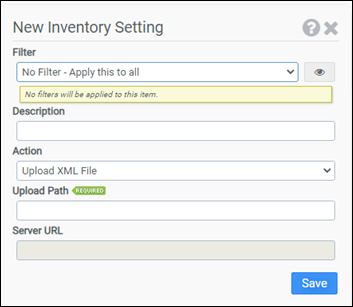
Filter
Select the name of the filter you want assigned to this configuration element. Click the Show Filter Details button on the right to review any filter settings without leaving Configuration Management.
Description
Enter a description for this rule.
Action
Choose whether you want to Upload XML File or Use Reporting Server.
Upload Path
The Upload Path designates the UNC name of the network share ProfileUnity will use to store the generated report in XML format. When you create the share, you will need to grant write permission to all users using ProfileUnity. If this share is unavailable or does not have write permission, ProfileUnity will not create the report. This option only applies if you choose Upload XML File as the Action.
Note: Inside the share, ProfileUnity will create an XML file named "[computer name].xml" for each client machine that executes this module.
Server URL
The Server URL is the address of the machine running the ProfileUnity Management Console. The URL can either be a fully qualified domain name or an IP address. This option only applies if you choose Use Reporting Server as the Action.
Example 1
Example 1 sends inventory reports to the ProfileUnity Management Console at https://ssv2.liquidwarelabs.com. The connection will be made using SSL.
- Filter: No Filter – Apply this to all
- Action: Use Reporting Server
- Server URL: https://ssv2.liquidwarelabs.com
Example 2
Example 2 creates reports in XML format on the network share \\ATLFS02\inventory$.
- Filter: No Filter – Apply this to all
- Action: Upload XML File
- Upload Path: \\ATLFS02\inventory$$
Note: The share name used for the Upload Path is \\ATLFS02\inventory$. Since $ is a reserved character, it has been escaped with $$.


