This module allows you to modify the default file locations for Microsoft Office. This module supports Office 2003/2007/2010/2013/2016.
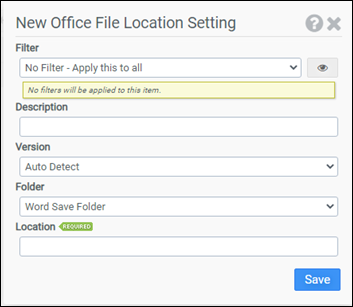
Filter
Select the name of the filter you want assigned to this configuration element. Click the Show Filter Details button on the right to review any filter settings without leaving Configuration Management.
Description
Enter a description for this rule.
Version
Select the version of Office you want to modify. The recommended setting is Auto Detect. However, if you want to specify different locations for different versions of Office, you will need to specify the version you want to modify.
Folder
Select one of the following folders:
- Word Save Folder: Supports Word 2003 and newer
- Word Clip Art Folder: Supports Word 2003 and newer
- Word Tools Folder: Supports Word 2003 and newer
- Word AutoRecovery Folder: Supports Word 2003 and newer
- Word Startup Folder: Supports Word 2003 and newer
- Excel Save Folder: Supports Excel 2003 and newer
- Excel Alternate Startup Folder: Supports Excel 2003 and newer
- Power Point Save Folder: Supports Power Point 2003 and newer
- Access Save Folder: Supports Access 2003 and newer
- Visio Save Folder: Supports Visio 2003 and newer
- Publisher Publications Folder: Supports Publisher 2003 and newer
- Publisher Pictures Folder: Supports Publisher 2003 and newer
- Office Templates Folder: Supports Office 2003 and newer
- Office Shared Templates Folder: Supports Office 2003 and newer
Location
Enter the full path to the location the Folder should default to.
Example
This example will redirect the Word Save Folder to H:\Documents. Since Auto Detect has been selected, all installed versions of Word will be modified.
- Filter: No Filter – Apply this to all
- Version: Auto Detect
- Folder: Word Save Folder
- Location: H:\Documents


