This module allows you to create rulesets for incorporating MSIX packages into your ProfileUnity setup.
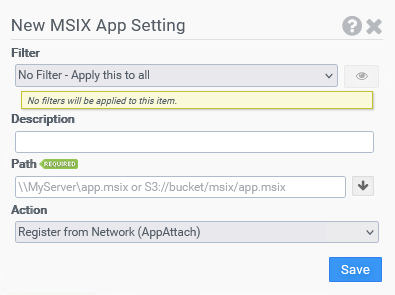
Filter
Select the name of the filter you want assigned to this configuration element. Click the Show Filter Details button on the right to review any filter settings without leaving Configuration Management.
Description
Enter a description that helps you identify your settings.
Path
Enter the full path to the MSIX, MSIXBundle package, or VHD/VHDX/CIM (for App Attach) to be played back.
Note: A cloud path will be processed as if the option Register from Local Cache was selected even if Register from Network (App Attach) was actually chosen. A VHD/VHDX/CIM (for App Playback) will be processed as if the Register from Network option was selected. Cloud-based CIM files are not supported because of their multi-file nature.
Action
Specify the location from which to register the package. Choose from Register from Network and Register from Local Cache.
Local Cache Path Override
If the Register from Local Cache option is selected, specify the local path to use for package registration. If you do not select a path, the default path will be used.
Example
This example creates a MSIX rule set that will use the network location of the MSIX package during registration.
-
Filter: No Filter - Apply this to all
-
MSIX Path: \\MyServer\MSIX\firefox.msix
-
Action: Register from Network


