This module allows you to make modifications to the search path. The path is modified in the environment of the current user.
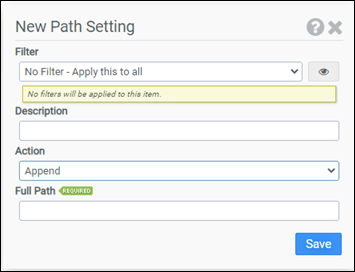
Filter
Select the name of the filter you want assigned to this configuration element. Click the Show Filter Details button on the right to review any filter settings without leaving Configuration Management.
Description
Enter a description for this rule.
Action
Select one of the following actions:
- Append: Adds to the current path
- Overwrite: Replaces the current path
Note: The Append action checks if the new path is already part of the configured path prior to adding it.
Full Path
Enter the path you want to append or replace the configured path with. Surrounding quotes are automatically added to the path.
Example
This example will append C:\Program Files\Tools to the configured path.
- Filter: No Filter – Apply this to all
- Action: Append
- Path: C:\Program Files\Tools


