This module allows you to set the time on your client machines from a centralized source. This feature is designed for use with Microsoft clients lacking a native time service. On clients with a native time service, the preferred method for setting the client machine's time is to use the time service.
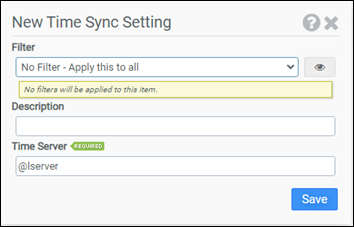
Filter
Select the name of the filter you want assigned to this configuration element. Click the Show Filter Details button on the right to review any filter settings without leaving Configuration Management.
Description
Enter a description for this rule.
Time Server
Enter the UNC name of the time server the client should set its time from.
Note: The recommended setting for the Time Server is the macro @LSERVER. The @LSERVER macro expands during logon into the name of the domain controller processing the logon request. If you use an alternative time server, you will need to use the server’s UNC name. For example, if you wanted to use a server name SVRA1, you would need to enter \\SVRA1 as the Time Server.
Example
This example synchronizes the client machine’s clock with the time obtained from the domain controller processing the logon request.
Note: Setting the system time on a Windows machine requires the Change the system time permission. By default, users do not have this permission.
- Filter: No Filter – Apply this to all
- Time Server: @lserver


