The Virtual Disks module is used to mount storage.
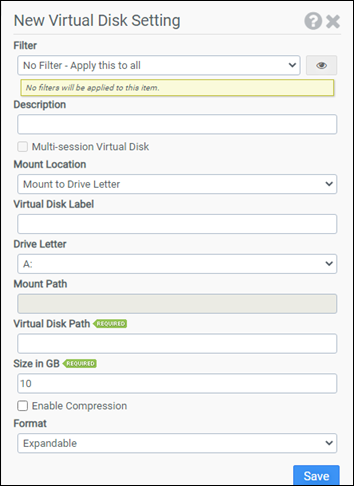
Filter
Select the name of the filter you want assigned to this configuration element. Click the Show Filter Details button on the right to review any filter settings without leaving Configuration Management.
Description
Enter a description for this rule.
Multi-session Virtual Disk
Selecting this checkbox will enable Multi-session Virtual Disk. The volume will be mounted using a read/write “child disk” and changes will be merged in during logoff. Multi-session Virtual Disks require VHDX formatting.
Mount Location
Select where to mount the disk. Choose from:
- Mount to Drive Letter
- Mount to Path
Virtual Disk Label
(Optional) Enter a custom label for the disk.
Drive Letter
Select the drive letter to which the image will be mounted. This option is only available if Mount to Drive Letter is chosen as the Mount Location.
Mount Path
Select the path to which the image will be mounted. This option is only available if Mount to Path is chosen as the Mount Location.
Virtual Disk Path
The Virtual Disk Path designates the UNC location ProfileUnity will use to store/retrieve the image file.
Size in GB
Enter the maximum size in gigabytes that the Virtual Disk will be allowed to use. This parameter is only used during initial Virtual Disk creation.
Enable Compression
Selecting this option will enable compression on the volume. This option is only used during initial Virtual Disk creation.
Format
Select whether the virtual disk should be Expandable or Fixed size. This option is only used during initial Virtual Disk creation.
Example
This example will create a new VHDX with the label of VirtualDisk_A and a fixed size of 10GB. The disk will not be compressed when created nor will Multi-session be enabled. The disk will be placed in \\mydomain\vd and mounted to drive letter A:. The disk will be mounted for all users.
- Filter: No Filter - Apply this to all
- Multi-session: Unchecked
- Mount Location: Mount to Drive Letter
- Virtual Disk Label: VirtualDisk_A
- Drive Letter: A:
- Mount Path:
- Virtual Disk Path: \\mydomain\vd\mydisk.vhdx
- Size in GB: 10
- Enable Compression: Unchecked
- Format: Fixed


