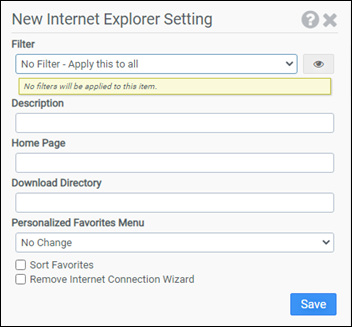
This module is used to configure Internet Explorer features such as Start Page, Download Directory, and Favorites. This module supports Internet Explorer 11.
Filter
Select the name of the filter you want assigned to this configuration element. Click the Show Filter Details button on the right to review any filter settings without leaving Configuration Management.
Description
Enter a description for this rule.
Home Page
Enter the URL of the page you want Internet Explorer to display on startup. If you want Internet Explorer to start with a blank page, enter about:blank for the Home Page.
Download Directory
The Download Directory is the location presented to the user when asked to save a file downloaded with Internet Explorer. Enter the full path to the folder you want to use.
Personalized Favorites Menu
The favorites menu is automatically updated to keep the favorites you use most often at the top of the menu where they are usually more accessible. This option allows you to control the Personalized Favorites Menu setting used by your users. Available choices are Enable, Disable, and No Change.
Sort Favorites
Selecting this option will sort the Internet Explorer Favorites menu alphabetically.
Remove Internet Connection Wizard
Selecting this option will disable the Internet Connection Wizard and remove the Internet Connection Wizard desktop shortcut.
Example
This example sets the Internet Explorer start page to http://www.liquidware.com, sets the download directory to C:\Temp, disables Personalized Favorites, and removes the Internet Connection Wizard.
- Filter: No Filter – Apply this to all
- Home Page: http://www.liquidware.com
- Download Directory: C:\Temp
- Personalized Favorites Menu: Disable
- Sort Favorites: Not selected
- Remove Internet Connection Wizard: Selected


