User Defined Aliases are used to retrieve information from your domain controllers about the current user's account. The values retrieved are available for use throughout your ProfileUnity configuration.
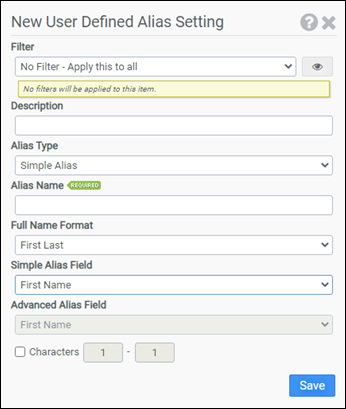
Filter
Select the name of the filter you want assigned to this configuration element. Click the Show Filter Details button on the right to review any filter settings without leaving Configuration Management.
Description
Enter a description for this rule.
Alias Type
A Simple Alias queries the domain controller for the Full Name field. An Advanced Alias queries an Active Directory domain controller for multiple attributes assigned to a user account. The Advanced Alias option is more powerful and retrieves more information than the Simple Alias option. However, the Advanced Alias option cannot be used in every environment.
Alias Name
Enter a descriptive name for your alias. This name can be used throughout your configuration and will be dynamically substituted with the value retrieved from the domain controller. An Alias Name is marked for substitution by prepending it with two dollar signs. For example, if you choose fname as your Alias Name, you need to use $$fname anywhere you want the substitution to occur.
Full Name Format
Select the format of the Full Name field. This option applies to Simple Aliases only. Choose from:
- First Last
- First Middle Last
- Last, First
- Last, First Middle
Simple Alias Field
The Simple Alias Fields are derived from the Full Name field. Select the field containing the values you want assigned to your Alias Name. This option applies to Simple Aliases only. Choose from:
- First Name
- Middle Name
- Last Name
Advanced Alias Field
The Advanced Alias Field corresponds to the fields listed in Active Directory. Select the field containing the value you want assigned to your Alias Name. This option applies to Advanced Aliases only.
Characters
This allows you to use only part of the value retrieved from the domain controller. If you enable this option, you will need to choose a starting character and an ending character. For example, entering one (1) for the starting character and eight (8) for the ending character would retrieve the first eight (8) characters.
Example 1
Example 1 creates an alias named email. This alias will contain the user’s email address retrieved from Active Directory. Anywhere you use $$email in your configuration, the user’s email address will be substituted.
- Filter: No Filter – Apply this to all
- Alias Type: Advanced Alias
- Alias Name: email
- Advanced Alias Field: E-mail
Example 2
Example 2 creates an alias named lname_initial. This alias will contain the first character of the user’s Last Name. The user’s Last Name is derived from the Full Name Format option and the Full Name value retrieved from the authenticating domain controller. Anywhere you use $$lname_initial in your configuration, the first character of the user’s Last Name will be substituted.
- Filter: No Filter – Apply this to all
- Alias Type: Simple Alias
- Alias Name: lname_initial
- Full Name Format: First Middle Last
- Simple Alias Field: Last Name
- Characters: 1-1


