This module is used to adjust Internet Explorer's proxy settings to match your network configuration. This module supports Internet Explorer 11.
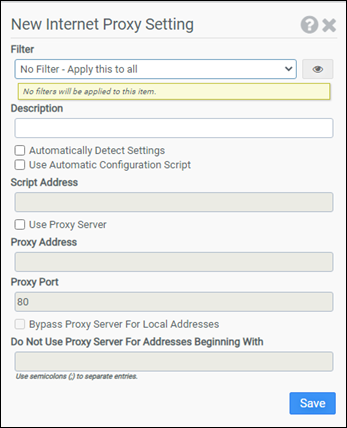
Filter
Select the name of the filter you want assigned to this configuration element. Click the Show Filter Details button on the right to review any filter settings without leaving Configuration Management.
Description
Enter a description for this rule.
Automatically Detect Settings
Selecting this option enables the browser’s automatic proxy detection feature.
Use Automatic Configuration Script
Select this option if you want to configure browser proxy settings with a configuration script. You will need to enter the complete path to the configuration script in the Script Address field.
Script Address
Enter the complete path to the configuration script you are using. This option is only available if Use Automatic Configuration Script is selected.
Use Proxy Server
Selecting this option instructs the browser to connect to the Internet by using the proxy server settings you specify in the Proxy Address and Proxy Port fields.
Note: You can configure the browser to use different proxy servers for different protocols by leaving the Proxy Port field blank and using the following format for the Proxy Address field: protocol=address:port. The available protocols are ftp, gopher, http, https, and socks. You will need to separate multiple entries with semicolons. For example: http=proxy1.company.com:8000;ftp=proxy2.company.com:3128
Proxy Address
Enter the proxy server address. This option is only available if Use Proxy Server has been selected.
Proxy Port
Enter the proxy server port. This option is only available if Use Proxy Server has been selected.
Bypass Proxy Server for Local Addresses
This option instructs the browser to bypass the configured proxy settings for local addresses. This option is only available if Use Proxy Server has been selected.
Do Not Use Proxy Server for Addresses Beginning With
Enter addresses that the browser should access without using the configured proxy settings. This option is only available if Use Proxy Server has been selected.
Note: You can use wildcards to match addresses. For example: *.xyz.com, 192.168.*.
Example
This example configures Internet Explorer to use proxy server proxy.liquidwarelabs.com on port 8000. The proxy server will not be used for local addresses or for addresses in the liquidwarelabs.com domain.
- Filter: No Filter – Apply this to all
- Automatically Detect Settings: Not selected
- Use Automatic Configuration Script: Not selected
- Use Proxy Server: Selected
- Proxy Address: proxy.liquidwarelabs.com
- Proxy Port: 8000
- Bypass Proxy Server for Local Addresses: Selected
- Do Not Use Proxy Server for Addresses Beginning With: *.liquidwarelabs.com


