This module allows other modules to run based on various events that occur on the machine.
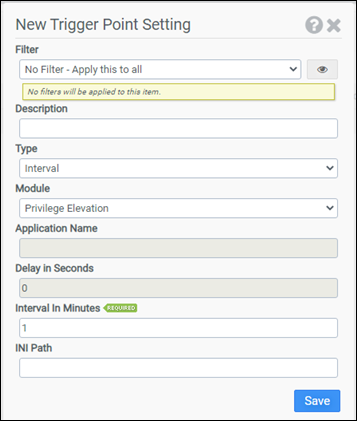
Filter
Select the name of the filter you want assigned to this configuration element. Click the Show Filter Details button on the right to review any filter settings without leaving Configuration Management.
Description
Enter a description for this rule.
Type
Select the type of event to listen to. Choose from:
- Interval
- PCoIP/Blast Reconnect
- PCoIP/Blast Connect
- PCoIP/Blast Disconnect
- ICA Connect
- ICA Disconnect
- RDP Connect
- RDP Disconnect
- Desktop Unlock
- Desktop Lock
- IP Address Change
- Application Open
- Application Close
- Computer Shutdown
- Post Login
Module
Select any of the ProfileUnity configuration modules you would like to run except for the Main or User Defined Scripts modules.
Application Name
The application name to monitor for on Application Open or Application Close events.
Delay in Seconds
Set how long to delay before triggering the module with the following events: IP Address Change and Computer Shutdown. For all other events, the delay is set to 0.
Interval in Minutes
Enter the interval rate at which to trigger the module with the Interval event.
INI Path
INI file is an advanced setting. By default, the current INI is assumed to process for trigger points.
Example 1
This example creates a trigger that will listen for any RDP Connects on a machine. Upon an RDP Connect, the Privilege Elevation module will be triggered.
- Filter: No Filter – Apply this to all
- Type: RDP Connect
- Module: Privilege Elevation
- INI Path:
Example 2
This example creates a trigger that will run the Printers module on a PCoIP reconnect. Now when a user moves around the building, they get a new default printer based on their current location.
- Filter: No Filter – Apply this to all
- Type: PCoIP Reconnect
- Module: Printers
- INI Path:
Example 3
This example creates a trigger that will save user portability settings every hour instead of only at logoff.
- Filter: No Filter – Apply this to all
- Type: Interval
- Module: Portability Save
- Interval in Minutes: 60
- INI Path:


