This module allows you to dynamically provision ThinApp packages.
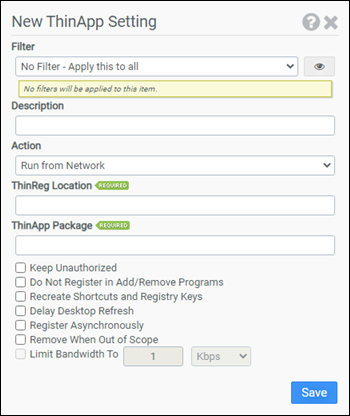
Filter
Select the name of the filter you want assigned to this configuration element. Click the Show Filter Details button on the right to review any filter settings without leaving Configuration Management.
Description
Enter a description for this rule.
Action
Select one of the following actions:
- Run from Network: The ThinApp package is executed from the network location.
- Run from Local Cache: The ThinApp package is cached on and runs from the local machine.
- Remove: The ThinApp package is removed, and the local cache is purged.
ThinReg Location
Enter the full path to the ThinReg executable.
ThinApp Package
Enter the full path to the ThinApp package(s). Wildcards are supported.
Keep Unauthorized
Enabling this option passes the /k switch to ThinReg. This option is not available if Remove is selected as the Action.
Do Not Register in Add/Remove Programs
Enabling this option passes the /noarp switch to ThinReg. This option is not available if Remove is selected as the Action.
Recreate Shortcuts and Registry Keys
Enabling this option passes the /r switch to ThinReg. This option is not available if Remove is selected as the Action.
Delay Desktop Refresh
Enabling this option passes the /nodesktoprefresh switch to ThinReg. This option requires ThinReg version 6.6.1 or newer.
Register Asynchronously
By default, ProfileUnity waits for each ThinReg operation to complete prior to continuing. When this option is selected, ProfileUnity will not wait and will process multiple ThinReg operations in parallel.
Remove When Out of Scope
Enabling this option will remove the ThinApp package if the selected Filter returns false. This option is not available if Remove is selected as the Action.
Limit Bandwidth to
Enabling this option will limit the amount of bandwidth used while caching the ThinApp package on the local machine. This option is only available if Run from Local Cache is chosen for Action.
Example 1
Example 1 will provision all the ThinApp packages located in \\file01\thinapps on the local machine. Each ThinApp package will be executed from the network.
- Filter: No Filter – Apply this to all
- Action: Run from Network
- ThinReg Location: \\file01\thinapps\thinreg.exe
- ThinApp Package: \\file01\thinapps\*.exe
- Keep Unauthorized: Not selected
- Do Not Register in Add/Remove Programs: Not selected
- Recreate Shortcuts and Registry Keys: Not selected
- Remove when Out of Scope: Not selected
Example 2
Example 2 provisions the ThinApp package \\file01\clientapps\Firefox.exe on the local machine. The ThinApp package will be cached locally using 1 Mbps of bandwidth and will execute from the local cache. Since Remove when Out of Scope has been selected, if the filter Laptop Users returns false, the ThinApp package will be removed.
- Filter: No Filter – Apply this to all
- Action: Run from Local Cache
- ThinReg Location: \\file01\clientapps\thinreg.exe
- ThinApp Package: \\file01\clientapps\Firefox.exe
- Keep Unauthorized: Not selected
- Do Not Register in Add/Remove Programs: Not selected
- Recreate Shortcuts and Registry Keys: Not selected
- Remove when Out of Scope: Selected
- Limit Bandwidth to: 1 Mbps


