The Profile Cleanup module is used to clean up a user's profile contents. The Profile Cleanup rules are evaluated at user login. If the cleanup schedule for the user matches the desktop’s day of the week or day of the month, then a flag will be set to remove the user’s profile from that desktop at the user’s next logoff.
Note: By default, this module is hidden. To use this configuration module, go to Administration > Settings > Miscellaneous and uncheck the Hide Profile Cleanup Module checkbox.
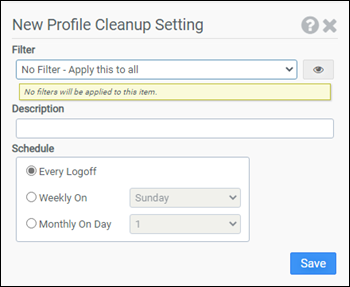
Filter
Select the name of the filter you want assigned to this configuration element. Click the Show Filter Details button on the right to review any filter settings without leaving Configuration Management.
Description
Enter a description for this rule.
Schedule
Select when this cleanup operation should be performed. Choose from:
- Every Logoff
- Weekly On and select a particular day of the week
- Monthly On Day and select a particular day of the month
Example
This example will cause a user's profile to be removed from the system upon every logoff for all users.
- Filter: No Filter - Apply this to all
- Schedule: Every Logoff
Note: In order to use the Profile Cleanup module you will need to edit your LwL.ProfileUnity.Client.Startup.Update.exe.config file, set "InstallProfile" to Deploy, "InstallProfile_LwlProfileService" to Start, and make sure that LwL.ProfileUnity.Client.Startup.exe gets re-run.


