This module allows you to configure Microsoft Office user information and set options that control interaction with the user. This module supports Office 2003/2007/2010/2013/2016.
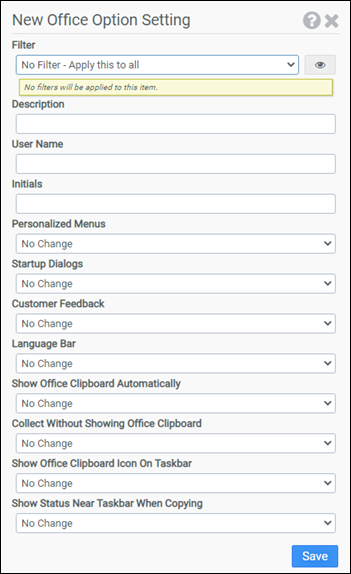
Filter
Select the name of the filter you want assigned to this configuration element. Click the Show Filter Details button on the right to review any filter settings without leaving Configuration Management.
Description
Enter a description for this rule.
User Name
Enter the username that Microsoft Office should use.
Initials
Enter the initials that Microsoft Office should use.
Personalized Menus
Office automatically updates menus to keep the features you use most often at the top of the menu where they are usually more accessible. This option allows you to control the Personalized Menus setting used by your users. Available choices are Enable, Disable, and No Change.
Startup Dialogs
This option allows you to control the Getting Started task pane that displays when an Office application is started. Available choices are Enable, Disable, and No Change. This option supports the following applications from Office 2003 and newer suites: Access, Excel, Power Point, Word, FrontPage, and Visio. Additionally, this option supports Publisher 2003.
Customer Feedback
This option controls whether Microsoft is allowed to collect anonymous usage statistics about the way you use Office. Available choices are Enable, Disable, and No Change.
Language Bar
This option controls the display of the Language Bar on the user desktop. Available choices are Enable, Disable, and No Change.
Show Office Clipboard Automatically
This option controls automatic display of the Office clipboard when copying items. Available choices are Enable, Disable, and No Change.
Collect Without Showing Office Clipboard
This option allows items to be copied to the Office clipboard without displaying the Office clipboard. Available choices are Enable, Disable, and No Change.
Show Office Clipboard Icon on Taskbar
This option controls display of the Office clipboard icon in the system tray when the Office clipboard is active. Available choices are Enable, Disable, and No Change.
Show Status Near Taskbar When Copying
This option controls display of the collected item message when copying items to the Office clipboard. Available choices are Enable, Disable, and No Change.
Example
This example leverages the macro @FULLNAME and the User Defined Aliases module. When ProfileUnity executes, the @FULLNAME macro is expanded into the user's full name. The $$first_initial and $$last_initial are User Defined Aliases that expand into the user's first initial and last initial respectively. Therefore, the Office User Name field will be set to the user's full name and the Office Initials field will be set to the user's first initial and last initial.Collect Without Showing Office Clipboard and Show Status Near Taskbar When Copying will be enabled. All other available options will be disabled.
- Filter: No Filter – Apply this to all
- User Name: @fullname
- Initials: $$first_initial$$last_initial
- Personalized Menus: Disable
- Startup Dialogs: Disable
- Customer Feedback: Disable
- Language Bar: Disable
- Show Office Clipboard Automatically: Disable
- Collect Without Showing Office Clipboard: Enable
- Show Office Clipboard Icon on Taskbar: Disable
- Show Status Near Taskbar When Copying: Enable


